Before you begin
- Sandbox is the open-ended place to learn the interface.
- Keep Him Alive uses case prompts and a constrained tool set.
- Story content depends on the release; v1.24 introduced Site B for supporters.
Read the version before the mode
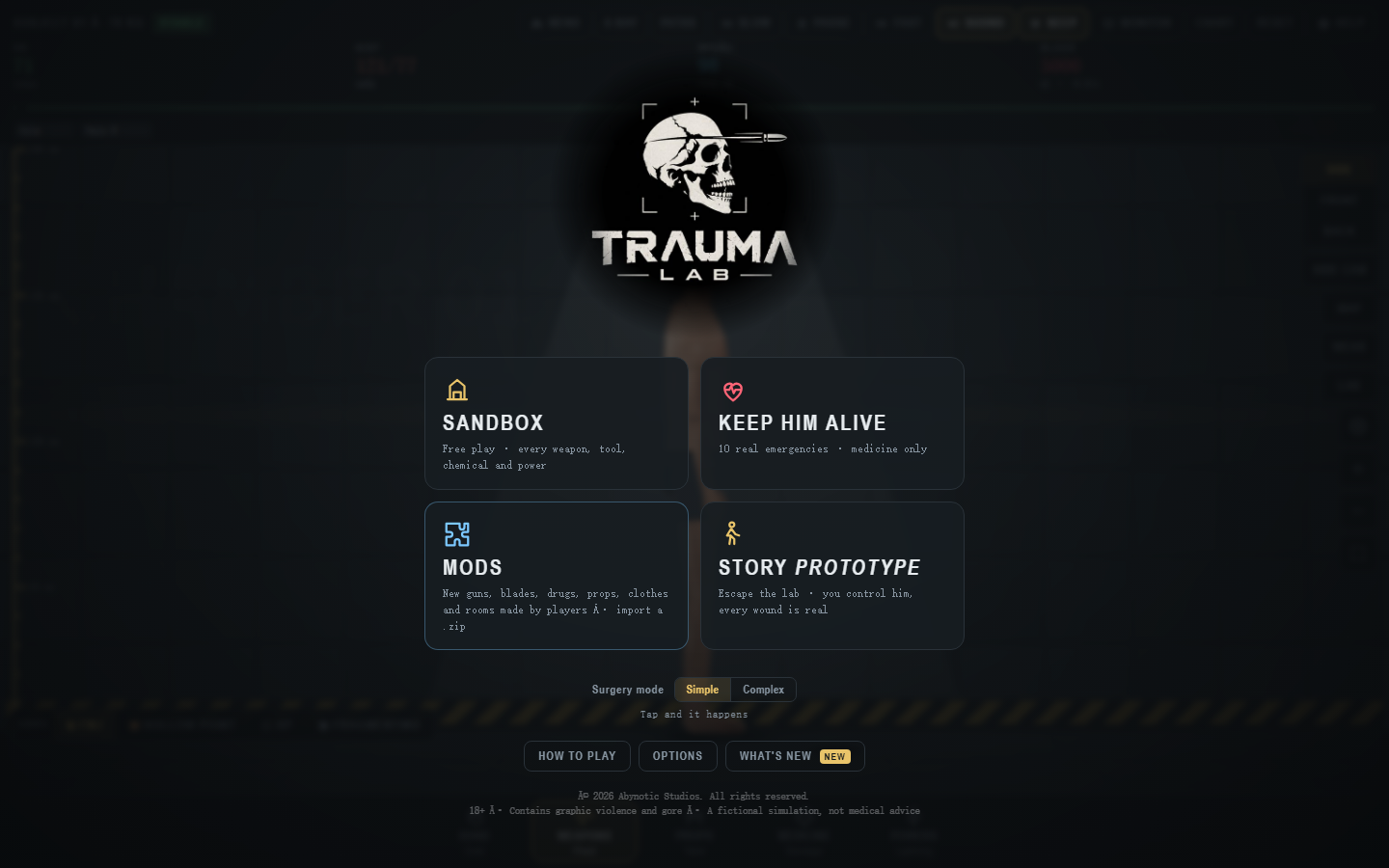
The four tiles in our menu screenshot—Sandbox, Keep Him Alive, Mods, and Story Prototype—were captured from the browser game on 31 October 2026. The game has changed since then. The v1.24 announcement introduced Site B for supporters; the official listing showed v1.25 free and supporter downloads on 13 November. We have not verified the version of this site's embedded browser game. Choose a mode based on the menu and prompts in the build you opened.
Sandbox: learn the systems
Choose Sandbox when you want to explore tools, views, props, physics, and readouts without a case objective. For a first session, locate Reset, Help, the category strip, monitor, and Chart. Pick one item, read its instruction, act once, and reset. This gives you a baseline before you compare another item or setting. The Start Here guide walks through that first session.
The creator's v1.22 notes add a Control tool for moving the subject in Sandbox. The v1.24 notes describe further gun and toolbar changes for the supporter build. A screenshot of the old category strip will not show every newer option. Check Help and the active tool prompt before assuming a control binding.
Keep Him Alive: solve a game case
The captured menu described this mode as ten emergencies with Medicine only. It changes the question from “what does this tool do?” to “what does this case ask me to accomplish?” Read the case prompt, note the starting status, and inspect the allowed tools. A missing Sandbox category can be part of the mode restriction. Use the game's feedback to learn its rules; familiar medical names do not make the case a real-world treatment exercise.
The free v1.23 release is described by the developer as a medical update in the v1.24 announcement. Our older screenshots do not verify the current case list or item layout. The Medicine guide explains how to read a picker and compare a game's status before and after one action.
Mods: change the Sandbox inventory
The v1.22 release notes say free players can use the Mods menu to import a .zip file on PC or phone. The creator lists additions such as items, clothes, and backgrounds, and says mods are for Sandbox. If you are learning the default game, start without mods so you know which content came with your build. When comparing two sessions, record whether a mod was active. Follow the current game's import instructions and use files from a source you trust.
Story: check which release you have
Our 31 October menu called Story a Prototype. The creator later announced a Chapter 1 for supporters in v1.22, then a larger Site B escape story in v1.24. The v1.24 post describes four floors, characters, stealth systems, and several endings. Those are developer-announced features of the supporter release, not a promise that the free browser build contains the same campaign. Use the menu, version label, and Help panel in your copy to establish what you can play.
Story has a different objective from Sandbox. Expect controls for character movement and interaction to differ from camera and tool selection. Read the mode's own instructions before applying a Sandbox shortcut.
Pick a mode quickly
- Learning the interface or testing a tool? Start in Sandbox.
- Want a constrained game challenge? Read a Keep Him Alive case prompt.
- Want to add player-made content? Learn the default Sandbox first, then use Mods.
- Want a narrative escape game? Check whether your release includes the Story content you expect.
When switching modes, close open panels, note your build and any active mods, and read the new mode's prompt. If a familiar action stops working, check the mode, selected tool, and Help before treating it as a bug. For exact interface navigation, continue to Controls and Interface.
Sources and scope
The old menu labels come from direct observation of the browser game on 31 October 2026. Release history comes from the creator's v1.22 notes and v1.24 announcement. Download availability was checked on the official game listing on 13 November 2026. Exact current menu wording and controls have not been re-captured for this guide.
Trauma Lab is in development. Check the official game page and developer updates for current availability and changes. This independent guide discusses a fictional game, not medical practice.